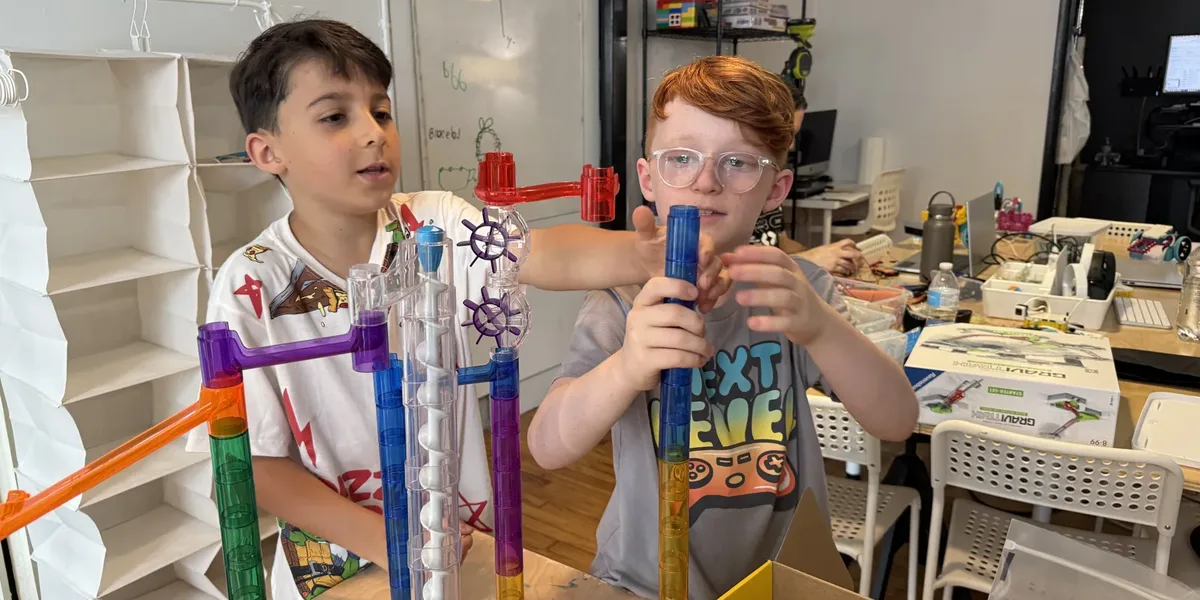
Most weekday mornings, our studio at 113 Liberty Street is quiet. The after-school kids don't arrive until the afternoon, and the robots, printing presses, and workbenches are ready to go. Homeschool families may have the opposite problem: plenty of daytime hours and not enough places to spend them on hands-on science, technology, engineering, art, and math. We think those two things belong together, and we're building a homeschool program to make it happen.
We want to be upfront that it's early. We've run daytime labs, we've learned a lot from the families who came, and we're shaping what comes next around what Newburgh's homeschoolers actually want. So this post is two things: a tour of what we teach across all five letters of STEAM, and an invitation to help us decide what the homeschool version of it should look like.
What STEAM looks like at Newburgh Creates
Integration, Synergy, Innovation.
STEAM is science, technology, engineering, art, and math, but we don't teach them as five separate subjects. A student who designs a marble run is doing engineering, measuring, creative thinking, and design at the same time. A student who codes a robot to follow a line is thinking in terms of math, logic, and troubleshooting, and then decorating the robot because it's theirs.
Student-Led, Project-Based, Hands-On
We are strong supporters of student-led and project-based learning. Much of what we run is project-based, so the subjects show up together in context - the way they do in real work. We love for students to build things, design things, and make things.
Here's what that covers, program by program. Everything below is something we already teach, and all of it can run in the daytime.
Art
Hanna Gundrum, a working muralist, teaches our Art Lab series: printmaking, paper mache, art journaling, and a digital art and illustration class on drawing tablets. Students carve blocks, mix ink, build sculptures layer by layer, and fill journals with their own spreads. Every student leaves with finished work. Hanna wrote about what kids get out of each class in her Art Lab post.
For homeschoolers, art isn't a separate track. Hanna leads the art and design side of our homeschool maker space lab, where studio art is folded into every build.
Maker Space / Engineering
BUILDLab is our flagship maker space program. Students sketch, prototype, and build real objects with real materials and tools: measuring, cutting, joining, finishing, and then presenting what they made. Cardboard City, for example, turns that into civic design, with students planning a city like urban planners and building it from cardboard and recycled materials. We also love finding ways to integrate electronics and microcontrollers into structural and 3d art projects.
Homeschool BUILDLab is the daytime edition and the first lab we built for homeschool families.
Robotics
ROBOLab is where most of our students meet robotics: building with LEGO Education SPIKE Prime, Edison robots, XRP, micro:bit, and many other platforms, students work with hubs and microcontrollers, sensors, and motors, and code what they built to accomplish tasks. Our FIRST LEGO League teams take that into competition, and FIRST Tech Challenge students design and build custom robots from scratch. Afterschool BattleBots is the loud one: design, build, and battle your own robot, then rebuild it better after it gets destroyed!
The homeschool version, Homeschool ROBOLab, is built around our collection of robotics platforms and hardware and our experience working with robotics students at various levels and in different settings.
Electronics
Robotics is electronics you can drive. FIRST Tech Challenge students wire their own robots: motors, sensors, controllers, and the power that runs them. As the homeschool program grows, we want to give younger students a proper introduction too: simple circuits, sensors, soldering, and small microcontroller projects that light up, make noise, and respond to the world. That's on the planning list rather than the calendar, and it's one to tell us about if your kids would go for it.
Programming
Kids code at every level here. Beginners start with Scratch and move into Python in Junior Coding Lab. In GAMINGLab, our summer game design camp, students build their own games: mechanics, levels, characters, and interactive stories, and they often make and program their own video games as well. Robotics students code in Pybricks, which lets them start with drag-and-drop blocks and switch to real Python without changing tools. FIRST Tech Challenge students program in Java. In every case, the code does something cool, which is the fastest way we know to make programming stick.
Music and piano
STEAM leaves out the M for music, but we don't. I teach private piano lessons at Newburgh Creates for children and adults: classical, jazz, pop, rock, and blues. Daytime lesson slots are a natural fit for homeschool students, who can practice when the rest of the world is at school. Lessons are one-on-one, so we start wherever your child is, and there are no recitals unless they want one. We are actively looking for ways to expand our music program, and I have a broad background in music, so let us know if you have any ideas.
How our homeschool labs work
A few things are true of every homeschool lab we run, whatever the schedule looks like in a given season. Groups are small and multi-age, the way homeschool groups actually are. Siblings can join together, and many projects scale, so a younger and an older child can work on the same challenge at different depths. Nobody needs prior experience.
Our first two labs, Homeschool BUILDLab and Homeschool ROBOLab, are where this started. Their current days and session dates live on those pages, and they'll change as the program grows, so check there or ask us for what's running now.
Help us build it
Here's the honest version: we'd rather build the homeschool schedule around real families than around our guesses. Electronics, coding, daytime art classes, more robotics, and music are all on the list. Which ones come first, and which mornings or afternoons they land on, depends on who asks.
So if you homeschool in or near Newburgh, reach out and tell us three things: your kids' ages, what they'd be most excited to try, and which days and times work for your family. That's all we need to start. We'll get back to you, and as the schedule firms up, you'll hear about it first.
Bring your homeschool pod
If you already run or belong to a homeschool pod or co-op, we'd love to host you. Our studio has workbenches, robotics kits, a printmaking setup, laptops, and a waiting area, and it's available on weekday mornings and afternoons when our own programs aren't running. That could mean a weekly meetup in our space, a lab we teach for your group, or something in between. Every group is different, so get in touch, tell us about yours, and we'll work out the details together.
Counting the hours in your IHIP
New York's home instruction regulation (8 NYCRR 100.10) asks homeschooling families to file an Individualized Home Instruction Plan each year and to send quarterly reports to the district. Families can count lab hours toward art, technology, and science enrichment, and we're happy to write up what your child worked on each session so it's easy to drop into a report. Just ask either instructor.
Scholarships
Cost shouldn't be the thing that keeps a family out. Partial scholarships are available for every program we run. The application takes a few minutes, asks for no income verification, and is answered within three business days.
Frequently asked questions
What homeschool programs do you offer?
We're building a daytime STEAM program for homeschool families, starting with hands-on labs in our maker space and robotics and growing from there. The current schedule lives on our program pages, and it will change as we add what families ask for. The best way to find out what's on is to reach out or just stop by our Liberty St. studio and say hello.
Does my child need any experience?
No. Every program starts from the beginning and meets each student where they are. Our labs are multi-age, siblings can join together, and projects scale up or down so younger and older kids can work side by side.
Can we count the hours in our IHIP?
Families can count our lab hours toward art, technology, and science enrichment in their Individualized Home Instruction Plan. We're happy to describe program activities for your quarterly reports. Just ask.
Can our homeschool pod use your space?
Yes, that's exactly what we're hoping for. Our studio at 113 Liberty Street is quiet on weekday mornings and afternoons. Reach out through the contact page and tell us about your group, and we'll work out the details together.
Are scholarships available?
Yes. Partial scholarships are available for every program. The application takes a few minutes, asks for no income verification, and is answered within three business days.
Sources
- New York State Education Department, Home Instruction (8 NYCRR 100.10): https://www.nysed.gov/nonpublic-schools/home-instruction
- Pybricks: https://pybricks.com