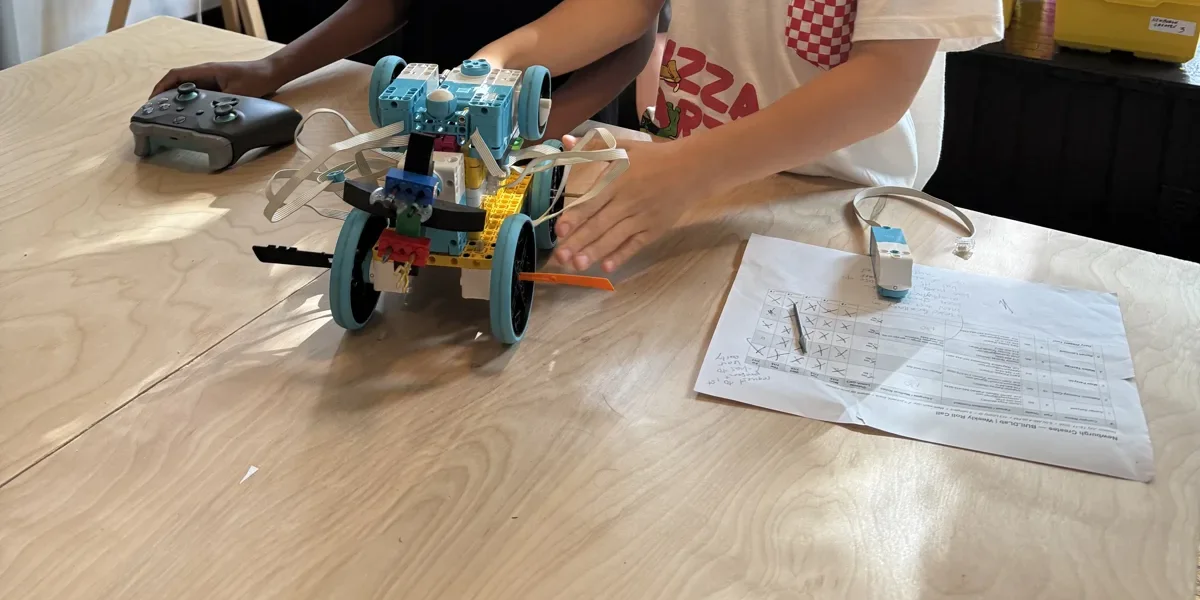
Walk past a robotics table at 113 Liberty Street and you'll see LEGO robots, a game mat, and a laptop open to a program made of colored blocks. The blocks aren't LEGO's own software. They're Pybricks, an open-source project that we've made the standard for our FIRST LEGO League teams and ROBOLab program. Parents ask about it often enough that it deserves its own post.
What Pybricks is
Pybricks is software that runs on the small computer (the microcontroller) inside a LEGO robot, called the hub. It replaces the program LEGO ships on the hub and gives kids a different way to tell the robot what to do. You program it from a web page, code.pybricks.com, in the Chrome or Edge browser. Nothing is installed on the computer, and the program is sent to the robot over Bluetooth.
It was created by two engineers, Laurens Valk and David Lechner, who have been building LEGO robot software for more than a decade. The code is public on GitHub, and people around the world help test it and improve it. Our own instructor, Dave Long, is an active contributor to the Pybricks code base, which is a nice thing to be able to show kids: the tool they use is something real people, including people they know, help build.
Reason one: blocks and Python live in the same window
Most kids these days start coding with blocks. For robotics, this means dragging colored pieces together to make the robot drive forward or turn. Pybricks has blocks too. One reason we prefer Pybricks to the LEGO apps is a tab that shows the same program written as Python, the text language used by professional programmers and data scientists.
A ten-year-old builds with blocks. A twelve-year-old glances at the Python tab and notices that "drive forward 250 mm" is one short line of text. A fourteen-year-old starts typing that line directly. Nobody has to switch to a new tool, learn a new screen, or throw away what they already know. In our experience, that's where a lot of kids lose momentum with other software, and Pybricks removes that barrier.
Reason two: the robot does what you tell it
FIRST LEGO League missions are won by robots that go the same distance every time. With Pybricks, kids set up a "drive base" by typing in the wheel size and how far apart the wheels are, and after that the robot drives in millimeters and turns in degrees. The built-in gyro keeps it straight.
One of our favorite classroom programs is something we call gyro wall zero. The robot backs gently into the wall of the table, waits until it's completely still, sets its heading to zero, and then drives off perfectly square. Kids worked on it, tested it, and watched their mission runs improve. That's engineering: find the thing that makes the robot unreliable, fix the cause, and measure the difference.
Reason three: it runs without the cable
Once a program is downloaded, it lives on the hub. Kids press the button on the robot and it runs on the mat with the laptop closed. That matters at a competition, where there's no computer at the table, and it matters in a room of twenty kids, because nobody's tethered to a desk.
Reason four: the gamepad
Pybricks can talk to an ordinary Xbox controller over Bluetooth. A few lines of code turn a SPIKE Prime build into a remote-control rover, which is the fastest way we know to get a first-day student excited. It's also a great way to teach a programming concept called conditionals: "if the up button is pressed, both motors go forward" is the whole program.
Reason five: it keeps hardware alive
LEGO Education stopped selling the SPIKE line this summer. Our kits still work fine, and Pybricks will keep working on them for as long as the hubs do, because the project is not tied to LEGO's app or LEGO's schedule. It also runs on older LEGO hubs, including the Technic Hub and even the EV3 that many families have in a closet. When a parent asks "is the LEGO robot we bought years ago still useful?", the answer is yes, and Pybricks is how.
Reason six: it's open and it's honest
The Python side of Pybricks is free and open source, and the block editor is how the small team behind it funds the work. We think that's a fair trade. The documentation at docs.pybricks.com is clear enough that our older students can read it themselves, which is a skill we want them to have. And because the code is open, when something doesn't work the reason can be found, not guessed at.
What to know before trying it at home
Pybricks needs Chrome or Edge on a Chromebook, laptop, or desktop with Bluetooth. It doesn't run on iPads. Installing it replaces the hub's software, and Pybricks can restore the original firmware whenever you want. If your child wants to try it, the Pybricks site has a getting-started guide, and our ROBOLab instructors are happy to help at pickup.
For homeschool families
Right now our daytime homeschool offering is Homeschool BUILDLab on Thursday mornings. We're planning to expand the homeschool schedule to include a robotics lab built around the same SPIKE Prime robots and Pybricks programs described above, along with other programs from our after-school lineup. If a daytime robotics class would work for your family, let us know so we can plan around the interest.
Come and see
Our FIRST LEGO League teams and ROBOLab program use Pybricks. No experience needed. Families from Newburgh, Cornwall, New Windsor, Beacon, and across Orange County are welcome, and scholarships are available.
Sources
- Pybricks project site and getting-started guide: https://pybricks.com/
- Pybricks Code, the browser editor: https://code.pybricks.com/
- Pybricks documentation (DriveBase, XboxController, hub IMU): https://docs.pybricks.com/
- Pybricks source code on GitHub: https://github.com/pybricks/pybricks-micropython
- LEGO Education, "SPIKE Portfolio Retirement: What Users Need to Know" (sales ended June 30, 2026; app supported to June 30, 2031): https://education.lego.com/en-us/spike-update-2026/